When you enable the self-service enrollment and self-service registration feature in
the active Nymi Enterprise Server(NES) administration policy, users can re-enroll and
re-register their own Nymi Band or optionally a Nymi Band that is currently assigned to another user without the
assistance of an CWP Administrator.
Customizing Self-Service Re-Enrollment and Self_service Re-Registration in
the
Nymi Connected Worker Platform—Administration Guide provides detailed information
about how to configure the
NES active policy to
allow a user to self-enroll and self-register their own
Nymi Band or to the
Nymi Band of another user.
Note: User with SEOS-enabled Nymi Bands cannot use self-service re-enrollment to
re-enroll a Nymi Band that was previously assigned
to a another user.
Instruct the user to perform the following steps.
-
Perform the delete user data operation on the Nymi Band identified for re-enrollment.
-
For Secure NFC only, you must blacklist and delete the RFID entry for the
Nymi Band in the Evidian EAM Management Console.
-
Log into the Nymi Band Application and complete the steps for
enrollment.
The steps to complete a re-enrollment and re-registration are identical to the
steps that the user follows to complete a new enrollment and registration.
-
For FIDO2 only, when a user enrolls to another Nymi Band, the user must re-create the FIDO2
security key on the newly enrolled Nymi Band.
If the user re-enrolls/re-registers their own Nymi Band, the same Nymi Band appears in the User
Properties window in the NES Administrator Console.
If a user re-enrolls/re-registers a Nymi Band that
was assigned to another user, the following changes appear in the User
Properties window in the NES Administrator Console of
the Enrollment NES and Registration NES:
- The original Nymi Band appears for the user is
not active but remains as the primary Nymi Band.
- The newly enrolled Nymi Band appears for the
user and is set to active.
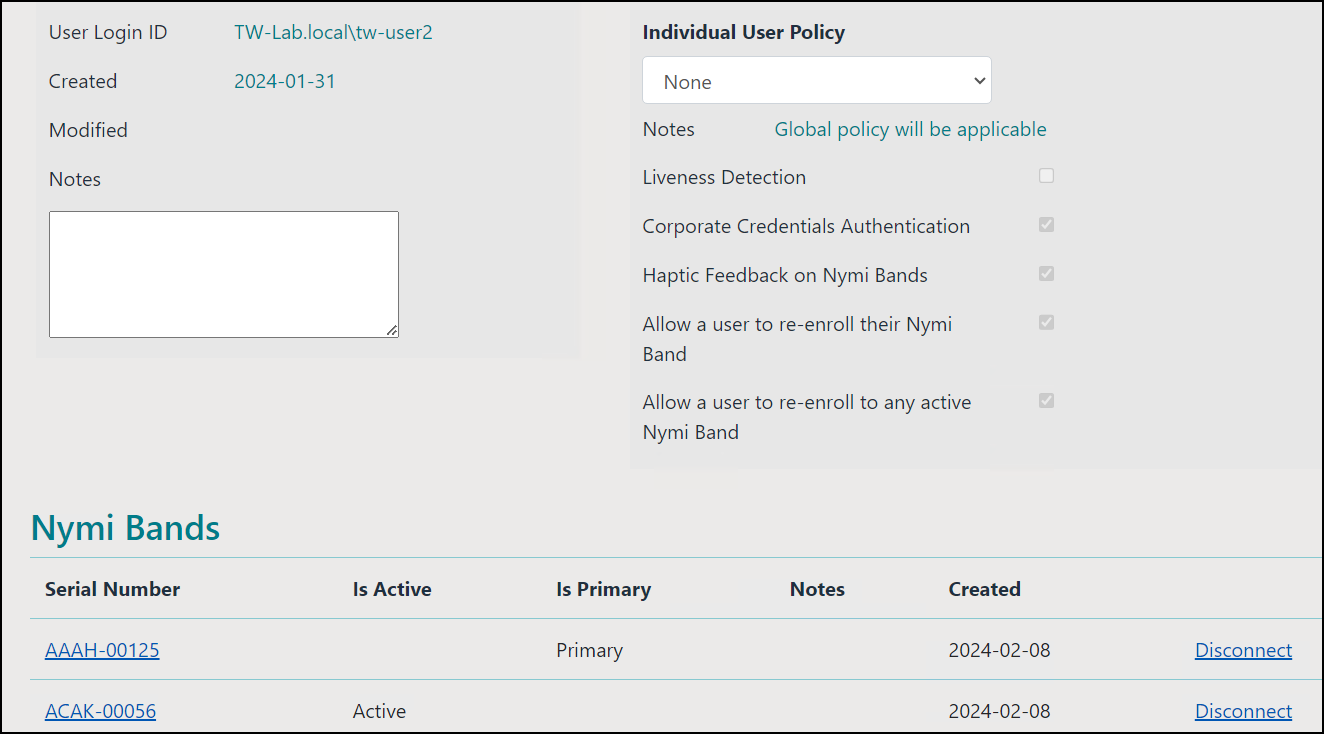
The following figure provides an example where a user named tw-user2 enrolled to a
Nymi Band with serial number AAAH-00125, and then
performed a self-service enrollment to second
Nymi Band
with serial number ACAK-00056.
Figure 1. User with multiple Nymi Bands after self-service
re-enrollment.


Comments
0 commentsPlease sign in to leave a comment.