
The error message "Application cannot be started" appears when you start the Nymi Enterprise Server (NES) Setup wizard.
The following figure shows this error message.
Figure 1. Applicaton Cannot Be started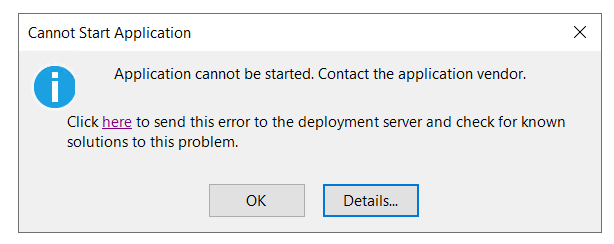
When you click Details, the following messages appear:
                PLATFORM VERSION INFO
                Windows 			: 10.0.17763.0 (Win32NT)
                Common Language Runtime 	: 4.0.30319.42000
                System.Deployment.dll 		: 4.8.4654.0 built by: NET48REL1LAST_B
                clr.dll 			: 4.8.4775.0 built by: NET48REL1LAST_B
                dfdll.dll 			: 4.8.4654.0 built by: NET48REL1LAST_B
                dfshim.dll 			: 10.0.17763.3406 (WinBuild.160101.0800)

                SOURCES
                Deployment url			: file:///C:/Users/twadmin/Downloads/nes-Release-5.8.1.6/NesInstaller/NESg2.Installer.application

                IDENTITIES
                Deployment Identity		: NESg2.Installer.application, Version=5.8.1.6, Culture=neutral, PublicKeyToken=0000000000000000, processorArchitecture=amd64

                APPLICATION SUMMARY
                * Installable application.

                ERROR SUMMARY
                Below is a summary of the errors, details of these errors are listed later in the log.
                * Activation of C:\Users\twadmin\Downloads\nes-Release-5.8.1.6\NesInstaller\NESg2.Installer.application resulted in exception. Following failure messages were detected:
                + Deployment and application do not have matching security zones.

                COMPONENT STORE TRANSACTION FAILURE SUMMARY
                No transaction error was detected.

                WARNINGS
                * The manifest for this application does not have a signature. Signature validation will be ignored.

                OPERATION PROGRESS STATUS
                * [4/9/2025 8:25:55 AM] : Activation of C:\Users\twadmin\Downloads\nes-Release-5.8.1.6\NesInstaller\NESg2.Installer.application has started.
                * [4/9/2025 8:25:56 AM] : Processing of deployment manifest has successfully completed.
                * [4/9/2025 8:25:56 AM] : Installation of the application has started.

                ERROR DETAILS
                Following errors were detected during this operation.
                * [4/9/2025 8:25:56 AM] System.Deployment.Application.InvalidDeploymentException (Zone)
                - Deployment and application do not have matching security zones.
                - Source: System.Deployment
                - Stack trace:
                at System.Deployment.Application.DownloadManager.DownloadApplicationManifest(AssemblyManifest deploymentManifest, String targetDir, Uri deploymentUri, IDownloadNotification notification, DownloadOptions options, Uri& appSourceUri, String& appManifestPath)
                at System.Deployment.Application.ApplicationActivator.DownloadApplication(SubscriptionState subState, ActivationDescription actDesc, Int64 transactionId, TempDirectory& downloadTemp)
                at System.Deployment.Application.ApplicationActivator.InstallApplication(SubscriptionState& subState, ActivationDescription actDesc)
                at System.Deployment.Application.ApplicationActivator.PerformDeploymentActivation(Uri activationUri, Boolean isShortcut, String textualSubId, String deploymentProviderUrlFromExtension, BrowserSettings browserSettings, String& errorPageUrl, Uri& deploymentUri)
                at System.Deployment.Application.ApplicationActivator.PerformDeploymentActivationWithRetry(Uri activationUri, Boolean isShortcut, String textualSubId, String deploymentProviderUrlFromExtension, BrowserSettings browserSettings, String& errorPageUrl)
                --- End of stack trace from previous location where exception was thrown ---
                at System.Runtime.ExceptionServices.ExceptionDispatchInfo.Throw()
                at System.Deployment.Application.ApplicationActivator.PerformDeploymentActivationWithRetry(Uri activationUri, Boolean isShortcut, String textualSubId, String deploymentProviderUrlFromExtension, BrowserSettings browserSettings, String& errorPageUrl)
                at System.Deployment.Application.ApplicationActivator.ActivateDeploymentWorker(Object state)

                COMPONENT STORE TRANSACTION DETAILS
                No transaction information is available.
Cause
The installer file is blocked.
Resolution
To resolve this issue, perform the following actions:
- Right-click the NESg2Installer.application file, and then select Properties.
- Select the Unblock, and then click
Apply.
The following figure provides an example of the selected Unblock option.
- Click OK.
- Re-run the NES installation.


Comments
0 commentsPlease sign in to leave a comment.